3D Objects Studio
Ready-made 3D objects for your designs: pick from a curated library, import GLB models or generate them with AI, orbit them live and bake the result into the document as an editable layer.
3D Objects Studio Extension3D Objects Studio 4 items #
Ready-made 3D objects for your designs: pick from a curated library, import GLB models or generate them with AI, orbit them live and bake the result into the document as an editable layer.
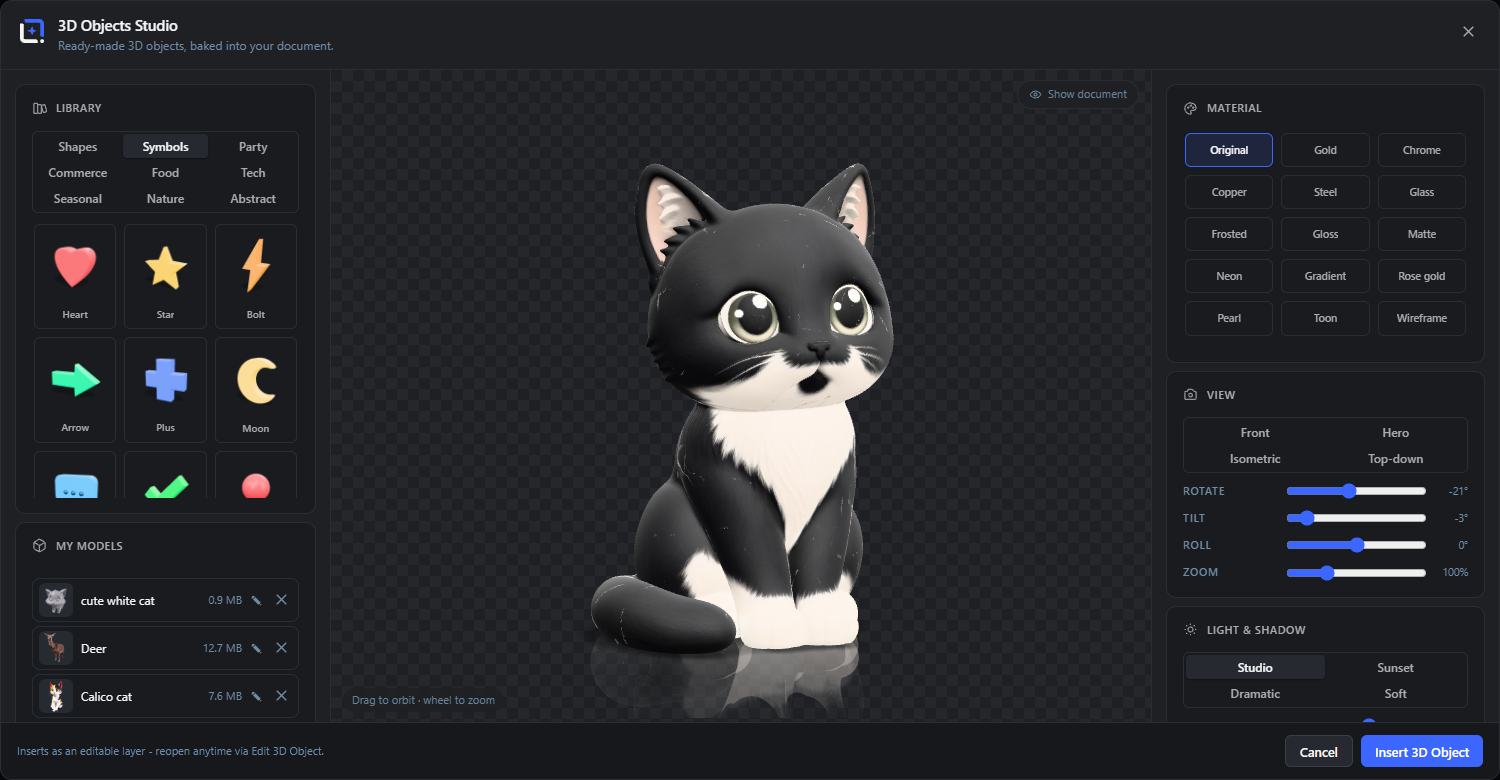
Ready-made 3D objects for your designs: a curated library across shapes, symbols, party, commerce, food, tech, seasonal, nature and abstract, each object with its own colors or repainted live with premium material presets from gold and chrome to glass, neon glow and toon.
Import your own textured GLB models and keep them in a server-side library shared across the site, or let AI build one: with a Meshy key, any media-library image or text prompt becomes a textured 3D model, saved straight to your library. Orbit with the mouse, pick light moods and camera angles, tune soft studio shadows and a ground reflection, and preview over your actual document.
Open it from the Extensions menu. The object bakes onto the canvas as a transparent PNG layer and stays editable via Edit 3D Object.
Requires a browser with WebGL2 and real graphics hardware. On software rendering the viewport stays blank; Help, then System Status shows what your device reports.
Library
#Over 150 ready-made 3D objects in nine categories (Shapes, Symbols, Party, Commerce, Food, Tech, Seasonal, Nature, Abstract), each rendered as a live thumbnail tile. Click a tile to load it into the viewport.
Show document
#Renders your current design behind the transparent viewport, so you judge the object over the real artwork instead of a checkerboard.
Insert 3D Object
#Bakes the current view as a transparent PNG layer, centered in the document. The layer stays editable: reopening the studio restores object, material, camera and light.
Drag to orbit / wheel to zoom
#Drag anywhere in the viewport to spin the object, use the mouse wheel to zoom. The Rotate and Tilt sliders follow along.
My models Extension3D Objects Studio 4 items #
Your site-wide 3D model library: every imported or AI-generated GLB, stored on the server with a preview thumbnail.
The card appears once the library holds at least one model. Models are shared with every editor user on the site; deleting or renaming is limited to the owner and administrators. Models and their thumbnails are included in plugin backups.
Model row
#Shows the preview thumbnail, name and file size. Click the name to load the model into the viewport; the active model is highlighted.
Rename (pencil)
#Turns the name into an input field. Enter or clicking elsewhere saves, Escape cancels.
Delete (x)
#Removes the model and its thumbnail from the server. Only the owner or an administrator can delete a model; layers already baked from it keep working.
Preview thumbnails
#AI-generated models keep the generator's own preview image; imported models get a small studio snapshot automatically. Older models receive a thumbnail the first time you load them.
AI 3D (Meshy) Extension3D Objects Studio 5 items #
Generate a textured 3D model from a media-library image or a text description, powered by Meshy.
Requires a Meshy API key under Settings, then Integrations. Generation runs through your server (the key never reaches the browser), takes a few minutes and uses Meshy credits; a progress percentage and Meshy's preview image keep you posted. Finished models are saved straight into My models and loaded into the viewport.
Image to 3D
#Choose image opens the media picker in an overlay; the selected photo (JPEG, PNG or WebP) is turned into a textured 3D model.
Text to 3D
#Describe the object in the prompt field and generate. Works best with a short, concrete description of a single object.
Refine (better textures, slower)
#Runs a second Meshy pass after the text preview that adds high-quality PBR textures. Takes longer and uses more credits.
Model name (optional)
#Names the entry in My models. Left empty, the image title or the start of your prompt is used.
Retry import
#If saving a finished generation fails, the button switches to Retry import: the next click only repeats the import and never re-charges a generation.
Import GLB Extension3D Objects Studio 2 items #
Load your own textured 3D models: binary glTF 2.0 (.glb) with embedded textures, parsed locally in the browser.
Models are centered and scaled to the studio's standard size automatically. Files up to 50 MB are supported.
Choose file
#Opens the file picker for a .glb file. Nothing is uploaded during parsing - the model is read locally.
Save to library
#Stores the imported model in My models on the server (on by default), so it survives reloads and stays editable on baked layers. Unchecked, the model lives only for this session.
Material Extension3D Objects Studio 4 items #
Repaint any object - library or imported - with one of 14 material presets, or keep its original colors.
Original shows each object's own colors. Every other preset repaints all parts with one surface: Gold, Chrome, Copper, Steel and Rose gold are fixed metals; Glass, Frosted, Gloss, Matte, Neon, Gradient, Pearl, Toon and Wireframe take your own color (Gradient takes two).
Color / Color 2
#The tint for colorable presets; Gradient blends Color into Color 2 from top to bottom. Switching presets seeds a sensible starting color.
Glow
#For the Neon preset: adds a bloom halo around the emissive surface (0 to 100).
Pearl
#A clearcoated surface with real iridescence that shifts hue as the object turns.
Wireframe
#Renders only the triangle edges of the mesh, the technical hologram look. Try it on the Globe.
View Extension3D Objects Studio 5 items #
Camera controls: one-click angles plus precise sliders.
Front / Hero / Isometric / Top-down
#One-click camera angles: straight-on, the classic three-quarter product angle, a 45-degree isometric view and a steep look from above.
Rotate
#Spins the object around its vertical axis (-180 to 180 degrees). Dragging in the viewport moves this slider too.
Tilt
#Raises or lowers the camera (-10 to 60 degrees).
Roll
#Leans the object itself sideways (-180 to 180 degrees), for tumbling or floating compositions.
Zoom
#Camera distance from 50 to 240 percent; the mouse wheel adjusts it too.
Light & Shadow Extension3D Objects Studio 5 items #
Studio lighting with one-click moods, a soft ground shadow and an optional floor reflection.
Studio / Sunset / Dramatic / Soft
#Lighting moods: neutral studio light, warm low sun with violet fill, hard single-source contrast, or bright and nearly shadowless.
Light
#Overall brightness of the rig (0 to 100).
Shadow
#Opacity of the soft ground shadow; 0 switches the floor off entirely.
Blur / Length / Direction
#Shape the ground shadow: softness of its edge, how far it stretches, and the angle it falls at.
Reflection
#A fading mirror image below the object, as if it stood on glossy studio flooring (0 to 100).