Star Map Posters
The night sky over any place at any date, dressed up as a poster.
Overview ExtensionLocal AI #
The night sky over any place at any date, dressed up as a poster.
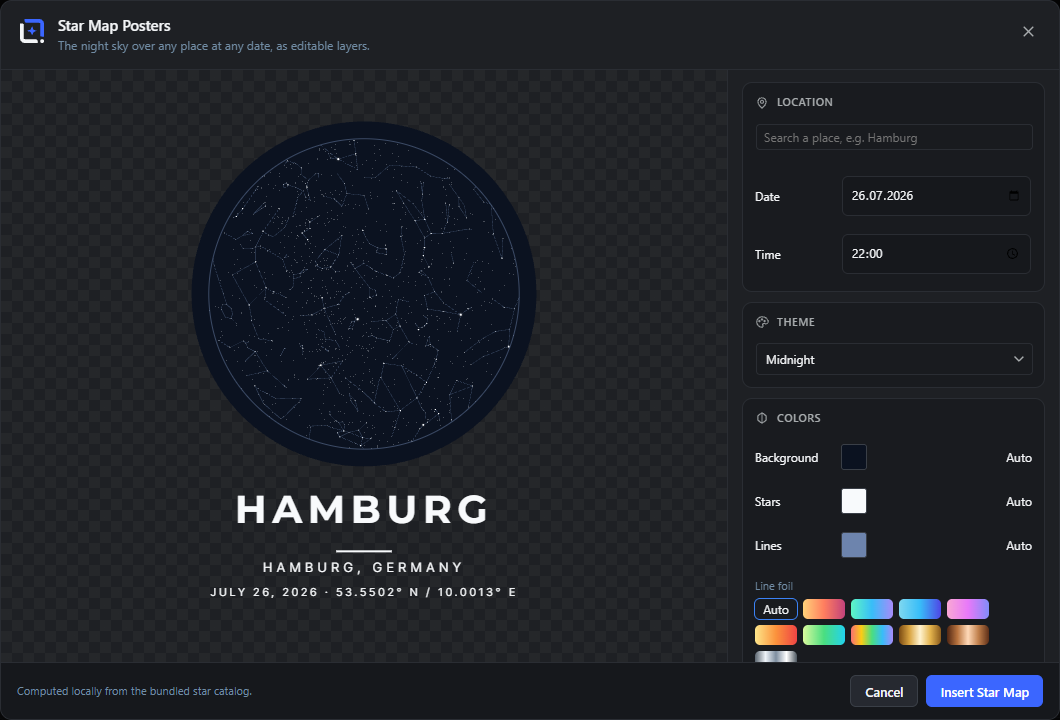
The night sky over any place at any date, as a poster: search a location, pick the moment, choose a theme and shape, and toggle constellation lines, the grid and the cardinal directions.
Then dress the chart up: foil constellation lines in gold, copper, chrome or color gradients, a neon glow slider, diffraction spikes on the brightest stars, real astronomical star colors, the actual Milky Way band computed for your place and moment, and a constellation highlight that lets one constellation, the birth sign, the favorite, shine bold while the rest of the sky steps back.
Open it from the Extensions menu. Insert the chart with a classic title, subtitle and date and coordinates block, all as editable layers. Everything is computed locally from the bundled star catalog, and any chart reopens via Edit Star Map Posters.
Location, date and time ExtensionLocal AI 5 items #
Search for a place and pick the exact date and time of the sky you want to chart.
Star Map Posters charts the real night sky over any place at any moment. The Location card is where you set the where and when: search a place, then pick the date and time.
The sky is computed locally from a bundled star catalogue, so it appears instantly. The only network step is the one-time place search. On a fresh open the studio seeds the last place you charted, or Oldenburg, Germany as a fallback.
Search a place
#Type a place name to look it up through the editor's geo proxy. Matches appear as a dropdown of results; pick one to set the sky's location.
Tip. Press Enter to pick the first result.
Search results
#The dropdown list of matching places under the search box. Each row shows the place name and its region; click one to select it.
Coordinates line
#A small line showing the latitude and longitude of the selected place, so you can confirm you picked the right spot.
Date
#The calendar date whose sky is charted. Defaults to today. Pick a birthday, anniversary, or any meaningful day.
Time
#The clock time on that date whose sky is charted. The stars rotate through the night, so the time matters.
Theme Extension 1 item #
Choose a color theme for the sky, stars, and lines.
The Theme card is a dropdown of named presets, each setting the sky background, star and line colors together. Picking a theme clears any custom colors set under Colors.
Theme tiles
#A dropdown of color presets. Pick one to recolor the whole chart (background, stars and lines) in one step.
Tip. Choosing a theme resets the Background, Stars, and Lines color overrides.
Colors Extension 6 items #
Theme colors, custom overrides, and the v1.7 foil gradients for the constellation lines.
The Colors card fine-tunes the three colors the theme provides. Each row has a color swatch and an Auto button that returns it to the theme's color.
Background
#Sets a custom color for the sky background, overriding the theme. Opens the editor's color picker.
Stars
#Sets a custom color for the stars, overriding the theme. Opens the editor's color picker.
Tip. The Star colors toggle in the Sky card can tint stars by their real color instead.
Lines
#Sets a custom color for the constellation lines and grid, overriding the theme. Opens the editor's color picker.
Auto
#Clears the custom color on its row and returns it to the current theme's color. There is one Auto button per color.
Line foil
#Paints the constellation lines and the horizon ring with a curated gradient instead of one color - ten presets including gold, copper and chrome foils that read as pressed foil on dark themes. Auto returns to the theme line color.
Glow
#A neon halo around the constellation lines, the horizon ring and the bright stars. It also widens the star halos: more stars get a soft aura the higher the glow.
Sky (stars, lines, grid, shape) Extension 9 items #
Set star size and toggle constellation lines, grid, cardinal directions, star colors, and the chart shape.
The Sky card controls what is drawn on the chart itself: how big the stars are, which reference overlays appear, whether stars carry their real colors, and the outline the whole sky is clipped into.
Star size
#Scales every star's dot up or down. Larger stars read better at a distance; smaller stars give a finer, more accurate sky.
Constellation lines
#Draws the lines that connect stars into constellations, from the bundled d3-celestial data. Turn off for a plain star field.
Coordinate grid
#Overlays a faint coordinate grid on the sky, for a more technical, chart-like look.
Cardinal directions
#Labels the horizon with the compass directions (N, E, S, W) so you can read which way you were facing.
Star colors
#Tints each star by its real color (blue-white to red) instead of a single color, for a more lifelike sky.
Shape
#Clips the chart into an outline: a circle (the natural sky dome), a full square, a rounded square, a heart, or a hexagon. Since v1.8.1 every shape draws its own edge line in the line color or foil - the heart gets its heart outline, just like the circle has its horizon ring.
Star spikes
#Diffraction spikes (the star-filter cross) on the brightest stars of the night - a subtle four-point cross plus a fainter diagonal pair on the very brightest.
Milky way
#A soft haze band along the real galactic plane, computed for your place and moment - if the Milky Way stood over that spot that night, this is where it was.
Highlight
#Spotlights one of the 88 constellations: pick it from the list (Latin names) and its lines are drawn bold with a halo while the rest of the sky steps back - the birth-sign poster in one click. Only constellations above the horizon at the chosen moment are visible on the chart.
Text block Extension 5 items #
Add the poster title, subtitle, and a date and coordinates line, and choose the text layout.
The Text block card adds the classic poster text around the chart. It only appears when inserting a new star map, not when editing one. The title and subtitle are filled from the searched place until you type your own.
Layout
#Chooses where the text sits. Classic poster puts a centred block below the chart; On the chart tucks the title and date inside the sky circle; No text shows the chart only.
Title
#The large headline, usually the place name. Auto-filled from the searched place until you edit it.
Tip. Renders in uppercase on the poster.
Subtitle
#A smaller line under the title, for the region or a phrase about the moment. Auto-filled from the place's region until you edit it.
Text size
#Scales the whole text block (title, subtitle, date line) up or down together.
Date and coordinates line
#Adds a line with the chosen date and the place's latitude and longitude, so the poster records exactly which sky it shows.
Insert and close Extension 3 items #
Insert the star map poster into the document, or cancel out.
The footer holds the two actions and a note that the sky is computed locally. Inserting adds the chart as a baked image plus real title, subtitle, date, and divider layers, grouped together. A small credit line reads "Yale Bright Star Catalogue · d3-celestial (BSD)".
Cancel
#Closes the studio without changing your document. The same as pressing Escape, clicking the X, or clicking outside the dialog.
Insert Star Map
#Adds the poster to your document: the sky chart as an image, plus the title, subtitle, date, and divider as real layers, all in one group. Disabled until a place is set.
Tip. The chart image stores its settings, so "Edit Star Map Posters" reopens this studio on the exact same sky.
Update Star Map
#Replaces the button label when you reopen an existing star map. It re-bakes the chart and settings in place instead of inserting a new group.