3D Particle Studio
A live particle engine: any layer becomes a cloud of particles you can shape, move and light.
3D Particle Studio overview Extension 4 items #
A live particle engine: any layer becomes a cloud of particles you can shape, move and light.
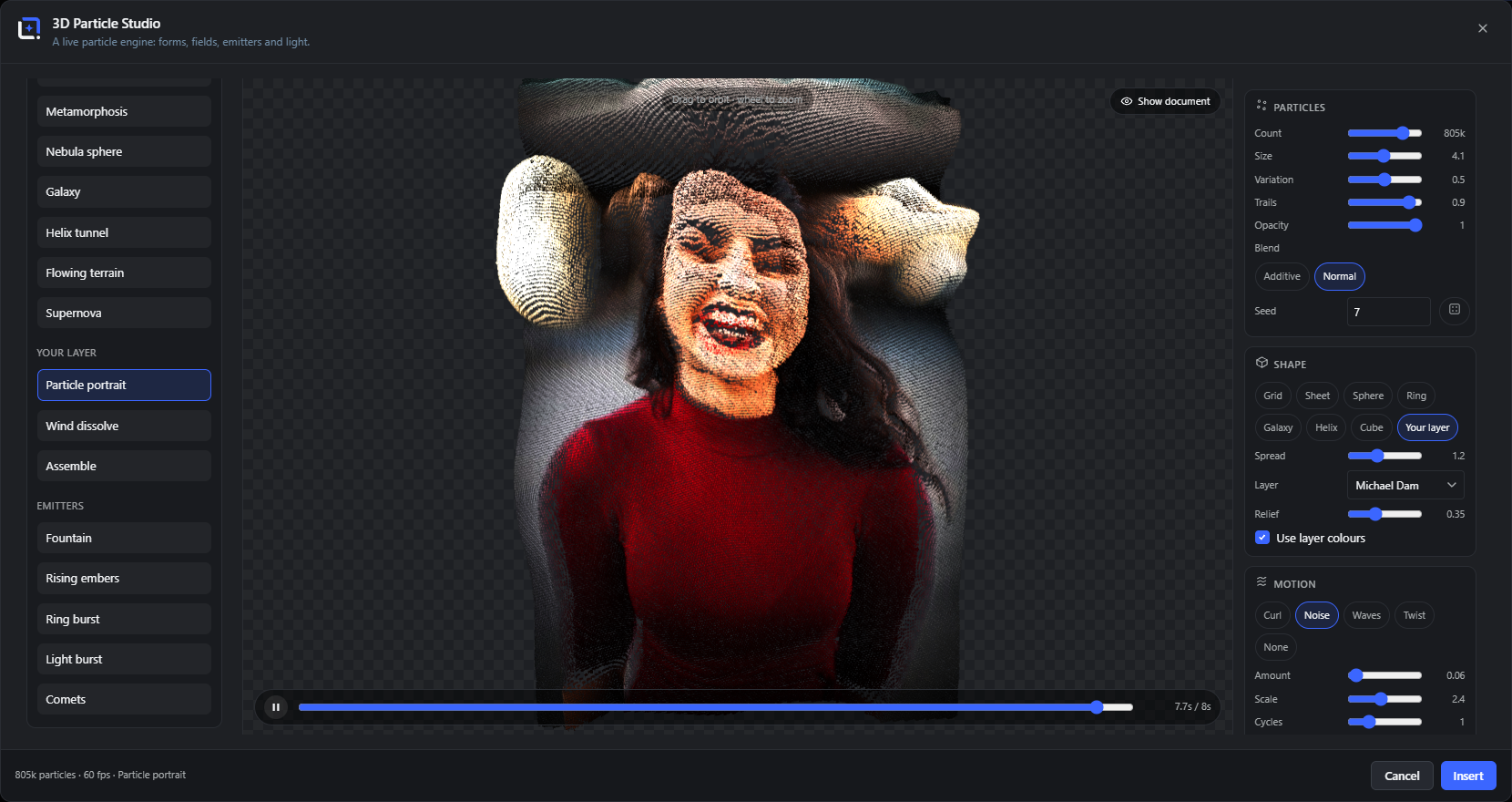
Point the engine at any layer and it rebuilds that layer out of particles, keeping its colors. The cloud can be poured into a shape, pushed by a motion field, fed by emitters and lit so its depth reads, all of it running on your graphics card and playing back in front of you.
Start from a preset and change any dial from there, or build a look from scratch: the number and size of the particles, the shape they take, how they move, and whether they leave trails, join into a plexus web or morph between forms. Drop magnets and vortices into the scene to pull the cloud around by hand.
Open it from the Extensions menu. Freeze the frame you like and place it on the canvas as a picture, or copy one block of HTML that carries its own viewer and keeps the engine running on any website, with no library and no request to anyone else’s server.
Drag to orbit, wheel to zoom.
#Dragging turns the camera around the cloud; the wheel moves it closer.
Show document
#Puts your original layer back on screen behind the particles, so you can line the cloud up with it.
%s particles · %d fps · %s
#The status line: how many particles are on screen, the current frame rate, and the preset in play.
Timeline
#A play head runs the animation on a loop; scrub it to land on an exact frame before you insert.
Particles Extension 13 items #
How many particles, how big, and how they blend.
The top panel sets the raw material: the size of the swarm and how each particle draws.
Count
#How many particles make up the cloud, from a sparse scatter to hundreds of thousands.
Size
#How large each particle is drawn.
Variation
#How much the sizes differ from one particle to the next, for a less uniform cloud.
Trails
#How long a fading tail each particle leaves behind as it moves.
Opacity
#How solid the particles are; lower values let the cloud build up where particles overlap.
Blend
#Additive makes overlapping particles glow and add up to light; Normal keeps them opaque like paint.
Seed
#The random starting point. The dice rolls a new one; the same seed always rebuilds the same cloud.
Sprite
#The particle’s own shape: glow dot, star sparkle, spark cross, ring, snowflake, hex bokeh, confetti plate, smoke puff - or any shape, SVG or text layer of your document, baked into a tiny mask.
Tumble
#Lets a share of the sprites spin and flutter like falling paper. Rotations complete in whole turns per loop, so the video still loops seamlessly.
Motion stretch
#Elongates each particle along its on-screen motion, like a short exposure. Fast sparks become streaks, slow drifts stay round.
Depth blur
#Depth of field: particles away from the focus plane swell into faint, soft bokeh discs while the sharp zone stays crisp. Computed per particle, so it costs nothing.
Focus
#Slides the sharp plane of Depth blur through the swarm, from the nearest particles to the farthest.
Breed variations
#Shows eight seed-children of the current look as small previews. Click one and it becomes the new parent, with its own children waiting - a quick way to explore the chaotic cards generation by generation.
Shape Extension 9 items #
The form the cloud is poured into.
The shape sets where the particles sit before any motion moves them. Your layer turns the swarm into a portrait of the picture itself.
Grid, Sheet, Sphere, Ring
#Simple forms: a flat grid, a filled sheet, a hollow sphere or a flat ring.
Galaxy, Helix, Cube
#A spiral galaxy, a twisting helix and a filled cube.
Your layer
#Builds the cloud from a layer in your document, so the particles form the shape of the picture and can keep its colors.
Torus knot, Ribbon, Möbius, Heart, Tornado
#Five sculptural homes: a trefoil knot, a woven Lissajous ribbon, a one-sided Möbius band, the classic filled heart curve and a twisting funnel. Every field, trail and morph works on them like on any other shape.
Text
#Type a few words and the swarm becomes them. The words are rasterised locally and sampled into particles, so they morph, disperse and travel like any other shape - and they survive into embeds, where the runtime rasterises them again.
Spread
#How far the particles fill out the chosen shape.
Layer
#Which layer the swarm is built from when the shape is Your layer.
Relief
#How far the brighter parts of your layer push forward, giving the flat picture depth.
Use layer colors
#Colors each particle from your layer, so a face stays a face while the cloud forms and dissolves.
Flames & attractors Extension 12 items #
Pure chaos, rendered as light.
These shapes are not drawn, they are settled into: every particle repeats a chaotic formula a dozen times and lands exactly where the mathematics concentrates, so hundreds of thousands of particles become a glowing density picture of the attractor itself.
The seed picks a curated parameter set and varies it slightly, so the dice always land on something worth keeping.
Fractal flame
#The classic iterated-function flame in its silky recipe: soft sine folds that build glowing ember structures. The palette follows the structure, not the position.
Night bloom
#A flame recipe with a swirling map inside, blooming into petal-like violet folds.
Cosmic lace
#A flame recipe folded through the disc, weaving ring-shaped golden lace.
Clifford veil
#The Clifford attractor: folded veils with bright caustic edges, given layered depth so the camera can look around it.
Dream mist
#The De Jong attractor: looping ribbons of mist. With a little motion stretch the drift shows as flowing streaks.
King's dream
#Pickover's three-dimensional attractor, a genuinely deep cloud that rewards orbiting.
Lorenz butterfly
#THE strange attractor: the Lorenz system, integrated live so the two wings of the butterfly emerge from hundreds of thousands of flowing particles. Drift lets the system breathe over the loop; trails turn it into streaming weather.
Aizawa orbit
#The Aizawa system: a glowing plasma sphere with a bright polar jet, drawn by particles orbiting a chaotic flow. Slow pendulum orbits show its depth best.
Hopalong web
#Barry Martin’s hopping map, settling into golden fractal webs. Every seed picks a curated parameter set and jitters it gently; the Breed button walks its children.
Mira bloom
#The Gumowski-Mira map, blooming into coral swirls and star-shaped ornaments. Small parameter steps change the species completely - breeding seeds is the way to explore it.
Flame style
#Chooses the flame recipe: Silky, Floral or Cosmic. Each one is a different family of variations, not just different colors.
Drift
#Lets the chaotic parameters breathe over the loop, so the structure slowly morphs and returns to its start without a seam. Zero freezes the picture.
Motion Extension 10 items #
The field that pushes the particles around.
A motion field moves the whole cloud at once. None holds it still.
Curl
#A swirling, smoke-like flow that keeps the cloud turning in on itself.
Noise
#A soft, organic drift that nudges every particle along a wandering path.
Waves
#A rolling wave that passes through the cloud.
Twist
#A rotation that winds the cloud around an axis.
None
#Switches motion off and holds the cloud in its shape.
Amount
#How strongly the field pushes.
Scale
#How large the field’s pattern is, from fine detail to broad sweeps.
Cycles
#How many times the motion repeats over one loop of the timeline.
Chladni
#The vibrating-plate field: particles gather on the nodal lines where real sand would settle, and the figure changes frequency over the loop.
Flow (image)
#Streams the particles along the contours of a picture. Pick a layer and the studio bakes a flow map from it; every particle then drifts along the strokes for one cycle, fades and is reborn - the painterly, van-Gogh-like current behind the Flowing paint preset. Amount sets the stream length, Cycles how many times the current runs per loop.
Trails, plexus and morph Extension 2 items #
Ways the particles relate to one another.
Beyond the individual particles, the cloud can draw connections and change between forms.
Pins: magnets and vortices Extension 2 items #
Handles you place in the scene to pull the cloud around by hand.
Pins are markers you drop into the scene. Each one bends the motion of the particles near it, and you can move them to shape the flow.
Emitters Extension 7 items #
Sources that throw new particles into the scene.
An emitter is a spout that keeps feeding fresh particles, on top of the cloud you shaped.
Fountain
#Sprays particles upward and lets them fall back down.
Rising embers
#Sends soft, glowing specks drifting upward like sparks off a fire.
Ring burst
#Throws a ring of particles outward from a point.
Light burst
#A bright flash of particles scattering out in every direction.
Comets
#Streaks that shoot across the scene trailing tails.
Fireworks, Confetti, Snowfall, Rain, Sparks, Smoke wisps
#The weather-and-celebration set: rockets that rise and burst in three staggered shells, fluttering paper, drifting flakes, streaking rain, crackling sparks and slow smoke - all seamless loops.
Camp fire, Candle flame
#Real fire: each particle is born white-hot and cools through yellow and orange into sooty red as it ages, because the color ramp follows the particle’s life. Motion stretch shapes the tongues; the candle is the same idea, small and calm.
Presets Extension 4 items #
Ready looks to start from.
Each preset sets the shape, motion and particles together. Load one, then change any dial from there. The presets under Your layer build from the picture you point them at.
Metamorphosis, Nebula sphere, Galaxy, Helix tunnel, Flowing terrain, Supernova
#Standalone looks that need no picture, from a slow morph to an exploding supernova.
Particle portrait, Wind dissolve, Assemble
#Looks built from your own layer: a portrait made of particles, a picture blown apart by the wind, or one that assembles itself into place.
Sand patterns, Torus knot, Light ribbon, Heart of sparks, Tornado, Starling swarm, Bokeh drift, Glitter
#The v4 form cards: Chladni sand figures, sculptural light shapes, a murmuration that never repeats, floating bokeh with real depth of field, and a sheet of glinting glitter.
Flowing paint
#Turns a layer of your document into flowing paint: the particles carry the picture’s own colors and stream along its contours in a seamless loop. Needs a picked layer, like Particle portrait.
A still or a living loop Extension 3 items #
Two ways to leave the studio.
Stop the timeline where it looks best, then choose how the result comes back.