3D Textile Studio
Your design on cloth that hangs, blows and drapes for real.
3D Textile Studio overview Extension 5 items #
Your design on cloth that hangs, blows and drapes for real.
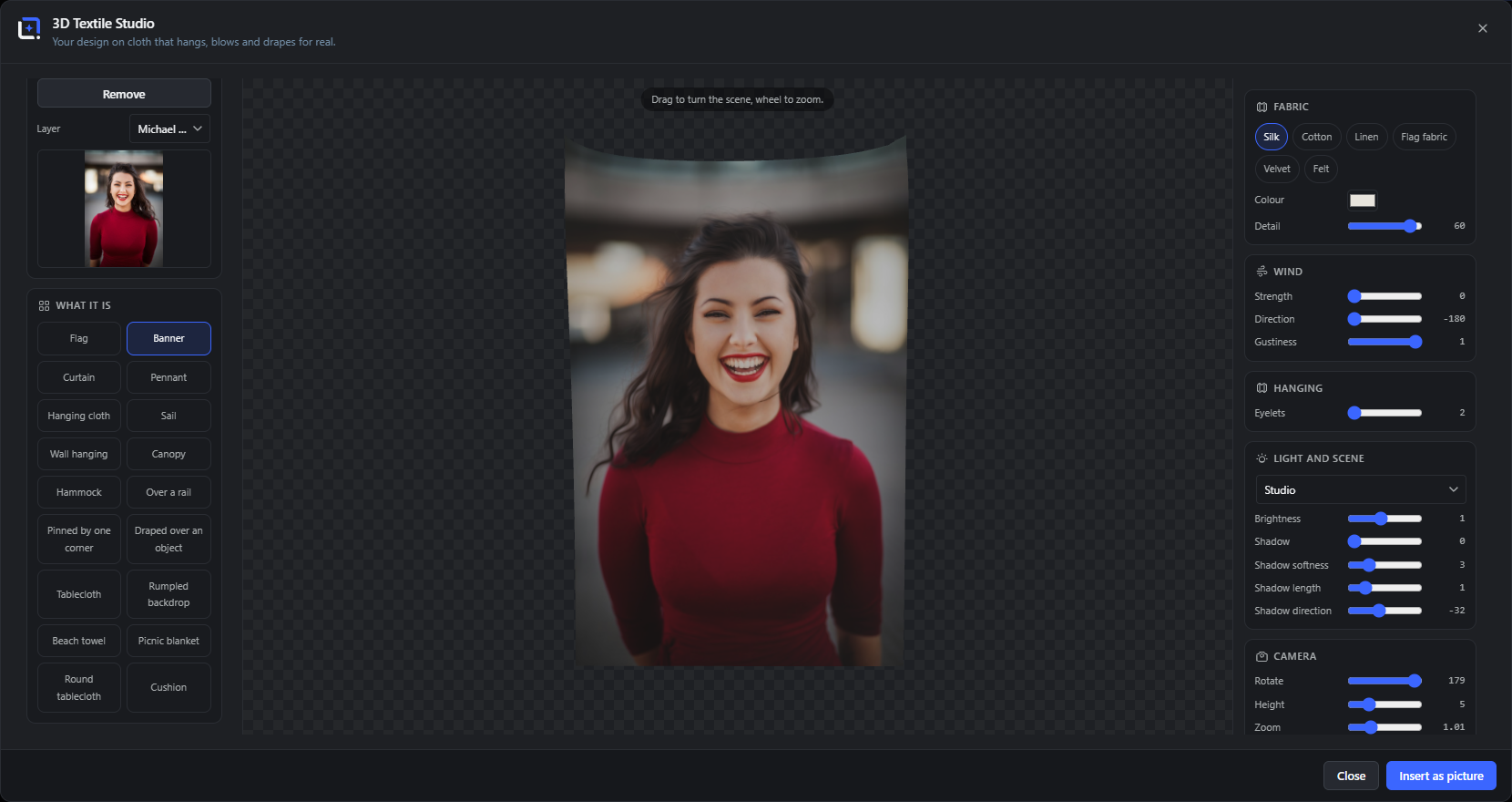
Drop a layer onto the fabric and it becomes cloth that behaves like the material you pick: silk falls soft, felt holds its shape, flag fabric snaps in the wind. Hang it from eyelets, blow it with a gust, drape it over a rail or pin it by one corner, and the folds form the way they would on the real thing, carrying your artwork through every crease.
A studio light and a movable camera set the shot, with control over the shadow so it sits where you want it. Everything is computed in your browser.
Open it from the Extensions menu. When it looks right, lay the finished drape back into your document as a picture.
Drag to turn the scene, wheel to zoom.
#Dragging turns the camera around the cloth; the wheel moves it closer.
Layer
#Which layer is printed onto the cloth. Its thumbnail shows above.
Remove
#Clears the artwork from the cloth, leaving the plain fabric.
Pluck
#Take hold of the cloth with the pointer, tug it, let go and it swings back. With the toggle on, the drag moves the fabric instead of the camera - arrange the folds by hand before freezing the still.
Back side
#The reverse of the cloth shows the design reading correctly (never mirrored), or carries its own second picture - a flag with two different faces.
What it is Extension 7 items #
What the cloth becomes: a flag, a banner, a tablecloth, and more.
The scene decides how the cloth is shaped and held, and which controls apply. Hung scenes get eyelets, draped ones settle over a form.
Flag, Banner, Pennant
#Cloth held on one side and left to move in the wind.
Curtain, Hanging cloth, Wall hanging, Canopy, Sail
#Cloth hung from above or stretched, falling into vertical folds.
Over a rail, Pinned by one corner, Draped over an object, Hammock
#Cloth that settles over a form or hangs from a single point.
Tablecloth, Round tablecloth, Beach towel, Picnic blanket, Rumpled backdrop, Cushion
#Cloth laid over a surface or bunched up as a backdrop.
Clothesline
#The sheet hangs from two clothespins set in from the corners and drawn slightly together: the slack between them sags, the free corners droop, and the wind plays with the whole lower edge. Laundry, not a banner.
Stage curtain
#Two velvet panels cut from one sheet - the weave is severed down the middle, so each half is its own piece of cloth, gathered towards its own side. The parting in the middle is the point: half open, the stage shows through, and the design runs across both panels.
Bedspread
#A cover over a mattress that is longer than it is wide: the cloth breaks over the long sides the way a tablecloth breaks over a rim, and the overhang falls down the flanks.
Fabric Extension 5 items #
The material, and how much detail it holds.
Each fabric falls, folds and catches light differently, so the same design reads as silk, felt or a stiff flag.
Silk, Cotton, Linen, Flag fabric, Velvet, Felt
#The six materials, from soft-falling silk to stiff felt and a snapping flag fabric.
Color
#The color of the plain cloth behind and around your artwork.
Detail
#How finely the cloth is simulated: higher detail gives smaller, truer folds at a little more cost.
Weave
#How visible the fabric structure is up close: a plain over-under for the woven materials, pile streaks for velvet, a felted surface for felt. Zero hides it entirely.
Edge (Plain, Hem, Fringe)
#The finish of the cloth border. A hem adds a folded edge with a stitch line just inside it; a fringe cuts real teeth into the free edges, and because the print rides the simulated mesh, the fringe swings with the cloth.
Wind Extension 3 items #
The air moving the cloth.
Wind sets the cloth in motion. With strength at zero it hangs still.
Hanging Extension 1 item #
How the cloth is held up.
On hung scenes, the fixing points decide where the folds start.
Eyelets
#How many points the cloth hangs from along the top, which sets how it gathers between them.
Light and scene Extension 7 items #
The studio light and the shadow it casts.
A scene preset sets the surroundings, and the light controls shape how the cloth is lit and how it shadows.
Looks
#Five one-click moods - clean studio, soft daylight, dramatic, warm evening, bright catalog - each driving light, shadow and environment together. The dials below stay available for the fine hand.
Studio
#The lighting environment the cloth sits in.
Brightness
#How strong the light is.
Shadow
#How dark the shadow the cloth casts is.
Shadow softness
#How blurred the shadow edge is, from a sharp edge to a soft falloff.
Shadow length
#How far the shadow reaches, which reads as the height of the light.
Shadow direction
#Which way the shadow falls, in degrees.
Camera Extension 3 items #
Where you view the cloth from.
The camera frames the shot without changing the cloth itself.
Export Extension 3 items #
Beyond the still: one loop of wind as video, or the living cloth on your website.
Video loop
#One full wind cycle as a WebM clip, downloaded or saved to the Media Library. The cloth first settles into its periodic motion, then exactly one cycle is taped, so the clip loops.
Loop
#Seconds per wind cycle - the pace of the gusts in the preview and the exact length of the recorded video.
Embed (HTML)
#A snippet that runs the cloth live on your website, pictures baked in. Visitors can push the fabric with the pointer; reduced motion gets a settled still, offscreen embeds sleep, and the page keeps its scroll.
Back into your document Extension 2 items #
Leaving the studio.
Turn the cloth to the angle you want, then bring the result back.